Part 1: What Is 9xbuddy? How to Use? Is It Safe, Legal, and Easy to Use?
🔗9xbuddy Website: https://9xbuddy.site/
9xbuddy is a multi-platform video downloader available through its website and apps for Windows, macOS, Android, and Linux. It supports downloading videos from various streaming and social media platforms, including YouTube, Facebook, Instagram, Vimeo, and Dailymotion. The web version works directly in a browser, while the apps provide a dedicated downloading experience.
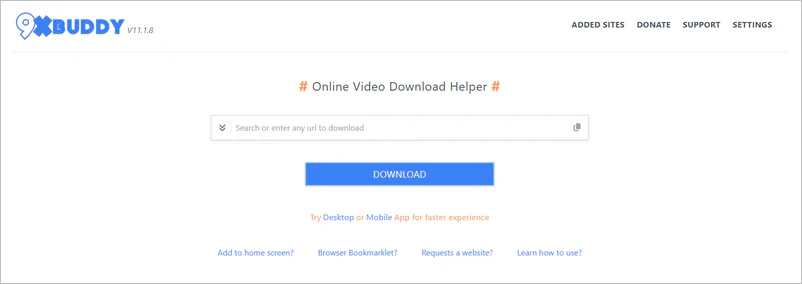
How to Use 9xbuddy Downloader Online
Step 1: Click to open 9xbuddy website and paste your video URL.
Step 2: Change the output file name in "options".
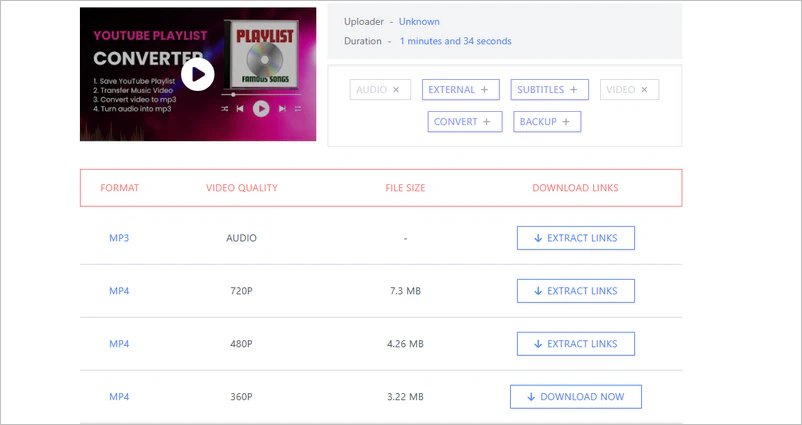
Step 3: Scroll down the page to see many formats: MP3, MP4, GIF, and more. Choose the format you need, then click "download now" on the right to start downloading the video/audio.
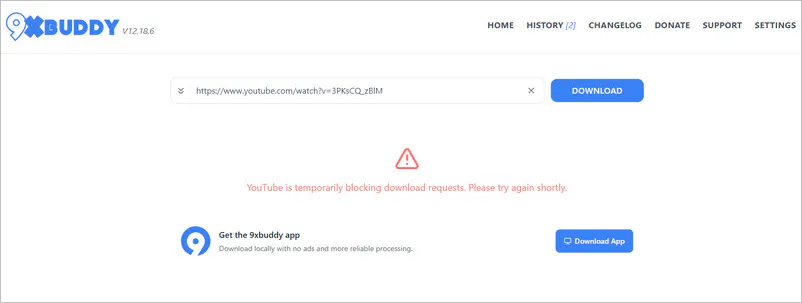
🚨Friendly reminder: 9xbuddy does not always handle YouTube downloads reliably. During our testing, the site successfully processed and downloaded a YouTube video one day, but on the following day, the download attempt returned a message saying that YouTube was temporarily blocking download requests.
If you encounter similar issues—or need to download playlists, or higher-quality content—you can use Any Video Converter. It supports free batch URL processing and playlist downloads.
Is 9xbuddy Safe, Legal, and Easy to Use?
In terms of operation, 9xbuddy is extremely simple to use and very user-friendly for computer beginners, fully meeting the standard of "easy to use". Technically speaking, the main safety concern is the ads, redirects and look-alike download buttons surrounding the download process. In our web test, after the 9xbuddy online downloader finishes parsing the video, an installation pop-up will appear. This was a point that made us feel unsafe during testing, though we were able to close the pop-up directly. If you prioritize safer and more stable downloads, it is recommended to use the official offline download button (such as YouTube Premium).
Is it legal? 9xbuddy itself is a downloading tool; the legality of using it depends on what you download and whether you have permission. YouTube prohibits downloading content unless the service expressly allows it or the appropriate permission has been obtained.
Pros:
🔴 No software installation required
🔴 Support multiple website links
🔴 Different download formats are available
Cons:
⚫ Download failures can occur
⚫ Unable to download playlist
⚫ No custom parameter options
⚫ Pop-up ads
Part 2: Alternative Solutions Related to 9xbuddy Downloader
Here, we've listed 3 9xbuddy alternatives that you might want to save as backup options for 9xbuddy.
| Option |
Best For |
Video Quality |
Output Format |
Batch Download |
| 9xbuddy Web |
Occasional download of individual public videos |
Up to 1080p but no audio |
MP4/MP3 |
❌ Not on web;
Pro feature in app |
| 🚀Any Video Converter |
Batch download and conversion for Windows/Mac |
8K/HDR YouTube videos |
MP4, MP3, M4A, MKV, FLAC, WAV |
✅ Batch+ playlist downloads |
| Vidicable |
Free YouTube downloading and recording |
Up to 8K |
Original, MP4, MP3 |
✅ Playlist downloads |
| Savesubs |
Temporary single video download |
360P |
MP4/MP3 |
❌ Not supported |
🚨Disclaimer: Do not use any downloader to download unauthorized content
1. Any Video Converter
✅ Up to 4K/8K video quality with reliable downloads
✅ Long videos, playlist, channel, and batch downloads for free
✅ Download video with audio + extractable audio/subtitle tracks
✅ Output as MP4, MP3, M4A, MKV, FLAC, WAV formats
✅ Auto-download new videos from YouTube
✅ Batch rename downloaded files
|
|
⚠️ Multiple quality options, but some HD downloads fail
⚠️ Supports long videos, but YouTube downloads may fail
⚠️ Video/audio available, but HD video may have no audio
⚠️ Multiple formats, but options vary by video
|
|
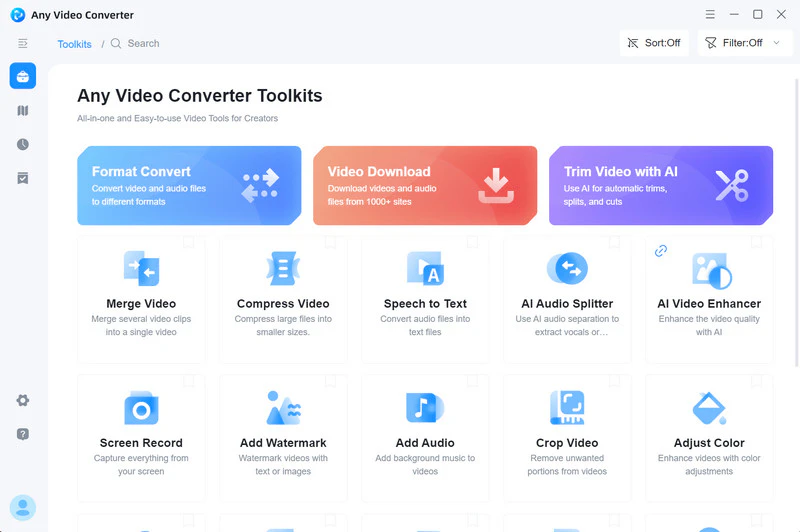
Any Video Converter is an all-in-one software application that combines video downloading, format conversion, and basic editing features. It supports YouTube and over 1,000 other media sites, allowing you to download videos and convert them into various formats such as MP4 and MP3. You can also add multiple URLs at once, download YouTube playlists, and use built-in tools to trim, merge, and compress video/audio.
If you need to download multiple videos and handle long videos, this desktop application offers more controls than 9xbuddy online downloader.
Pros:
🔴 YouTube,
Dailymotion,
SoundCloud, 1000+ sites available
🔴 Choose video/audio parameters and format yourself
🔴 Download, convert, and edit videos for free
🔴 Automatically download new YouTube videos
🔴 Stable download and fast download speed
🔴 Safe program and no virus pop-ups
Cons:
⚫ Currently no online downloader
How to Download YouTube MP4 Videos with Any Video Converter
Step 1 Install Any Video Converter and launch it. The installation process takes less than a minute.
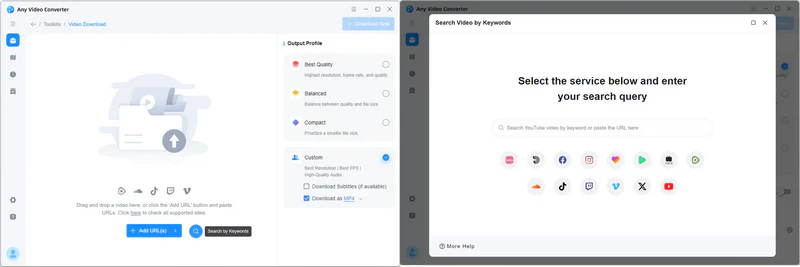
Step 2 Click to enter "Video Download" and open the YouTube browser in the program. Alternatively, you can choose to paste the video URLs.
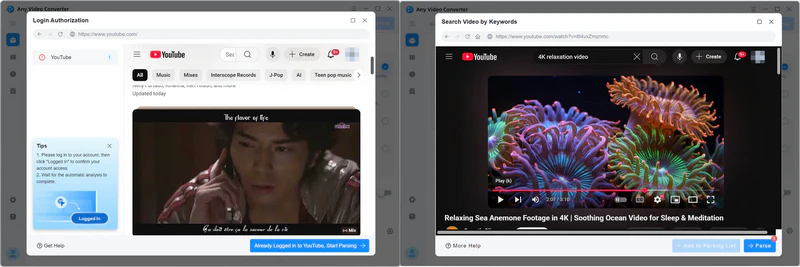
Step 3 Log in to your personal account within the program and then browse the videos you want to download. If you only want to download one video, click "Parse Now"; if you want to download videos in batches, click "Add to Parsing List".
🚨 If you choose to paste the URLs directly, skip this step
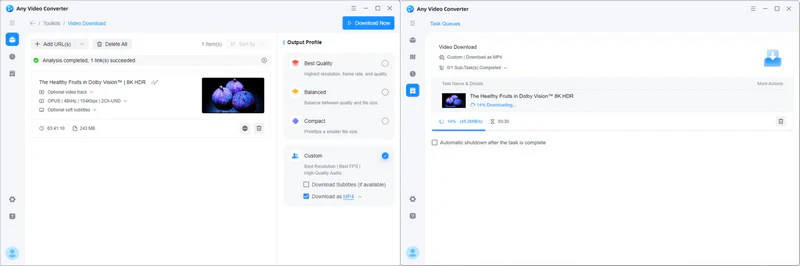
Step 4 Choose the MP4 output format. Then click "Download Now" to start downloading the MP4 video.
2. Vidicable
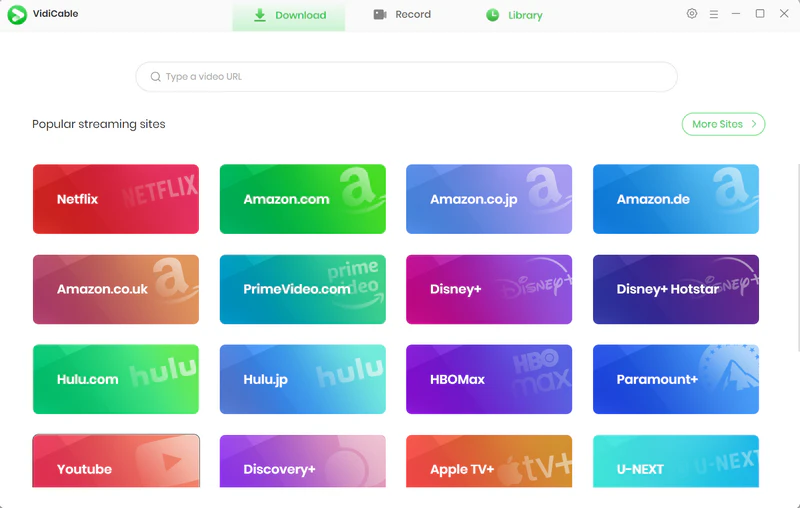
Vidicable has also been tested and can be considered as a 9xbuddy alternative. Netflix, Amazon Prime Video, HBO Max, and Disney+ are the websites it can parse and download. It also has some basic MP3 and MP4 conversion features. If video parsing fails, you can use the built-in video recorder to record and save HD video. If you prefer a desktop video downloader or need to download videos from streaming platforms that are not well supported by 9xbuddy, Vidicable is worth considering.
Pros:
🔴 Download YouTube videos for free
🔴 Easy to use, fast download speed
🔴 No ads
Cons:
⚫ Need installation
⚫ Limited video/audio formats
3. Savesubs
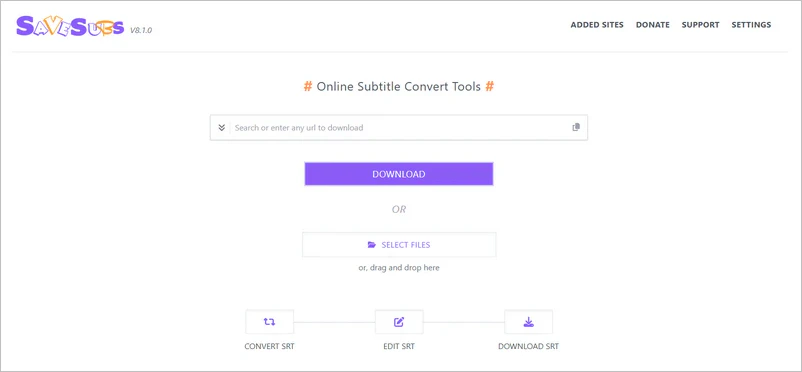
Savesubs is another alternative to 9xbuddy, but it focuses more on downloading videos and subtitles. It supports YouTube and other social platforms. After entering a video URL, you can select from the available video or subtitle files. Unlike 9xbuddy, Savesubs also offers tools for subtitle conversion and editing. If you need to download both videos and subtitles or work with SRT subtitle files, Savesubs is a more suitable choice.
Pros:
🔴 It can be used on both PCs and mobile devices
🔴 Offers editable subtitle options
🔴 Download both videos and subtitles
Cons:
⚫ Unstable downloads like 9xbuddy
⚫ Unable to download the original highest-quality video
⚫ Ads and privacy risks
Part 3: 9xbuddy App - Can It be Used on iPhone/Android?
🔗Google Play: https://play.google.com/store/apps/details?id=com.xbuddymobile.app
9xbuddy launched an Android mobile app and you can install it from Google Play. However, there is no iPhone app. iPhone users can use its online downloader in Safari.
According to its official description, the 9xbuddy app offers download speeds up to 10x faster and a more stable download process. However, it's important to note that after the 3-day free trial ends, your account reverts to the free plan with 5 downloads per day, and you'll need to top up your 9xbuddy app account to continue using certain premium features.
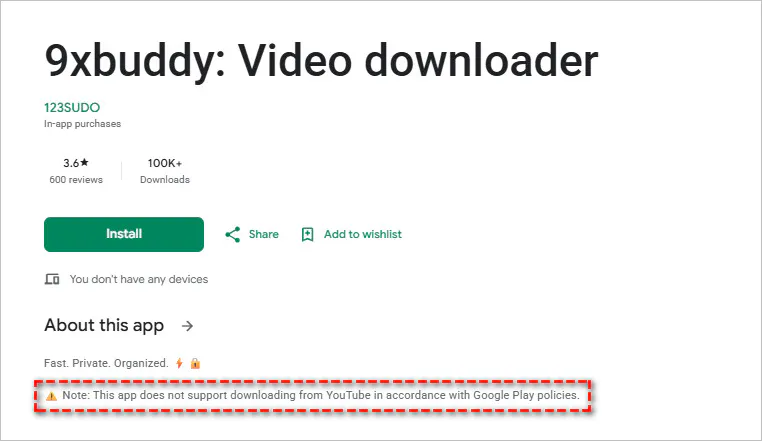
The 9xbuddy Android app does not support YouTube downloads.
The current Google Play page explicitly states that this app does not support YouTube downloads. Therefore, if your primary need is to download YouTube videos, installing this app will not solve the problem. If you wish to download other MP4 videos, you can follow the steps below.
How to Download MP4 Videos with the 9xbuddy App
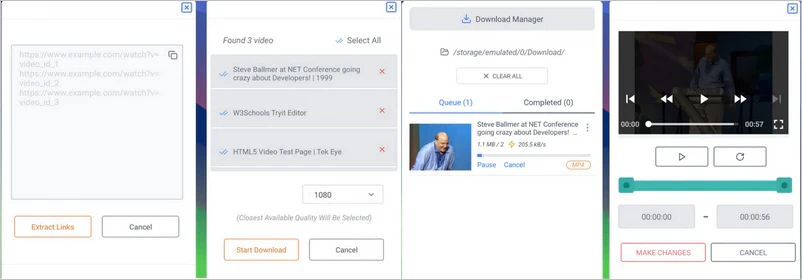
Step 1: Install the 9xbuddy app on your Android phone.
Step 2: Paste one or more non-YouTube video URLs.
Step 3: Select the video resolution and click "Start Download". You can check the download progress in "Download Manager".
Part 4: 9xbuddy Limitations: Web vs. App
1. YouTube Download Error
- As of September 2026, 9xbuddy (https://9xbuddy.site/) is still working. But sometimes, when downloading YouTube videos, it will show "YouTube is temporarily blocking download requests".
2. Slow Online Download Speed
- Download speeds can vary depending on server load, network conditions, and the size of the video being processed. During our testing, some downloads took longer than expected.
3. No YouTube Download in 9xbuddy App
- The 9xbuddy app does not support YouTube downloads, and online downloads sometimes encounter errors, so you'll still need to switch to the desktop version.
4. Some Links Work on the Website but Not in the App
- In Google Play reviews, users have reported that certain links open normally on the 9xbuddy website but fail to open in the Android app.
Part 5: FAQs about 9xbuddy
Why is 9xbuddy not working?
It may be related to issues with video links, website parsing, network connectivity, or server-side problems. During testing, we encountered instances where a video could be parsed one day but not the next. Therefore, if you experience a parsing failure, you can try again later. If the problem persists, you can switch to alternatives such as Any Video Converter, Vidicable, or Savesubs.
Why does 9xbuddy fail to download videos?
Even if 9xbuddy successfully parses a video, it does not guarantee that all download options will successfully generate a file. During testing, we found that clicking certain HD options resulted in the error message "We couldn't prepare this media file". Available quality and download outcomes can vary depending on the specific video. There has been no official response regarding this issue so far.
Can 9xbuddy download long videos online?
Yes. We tested 3-hour, 6-hour, and 8-hour YouTube videos; 9xbuddy successfully processed them and displayed multiple download options. However, only low-quality output options were available.
Does 9xbuddy have a download limit?
The current free plan for the 9xbuddy Android app offers five downloads per day. The web version does not specify a clear limit, and we successfully downloaded six videos.
Which websites does 9xbuddy support?
YouTube, Facebook, Instagram, Twitter, Vimeo, Dailymotion, TikTok, and SoundCloud - all these well-known websites are available currently. More supported websites, please check: https://9xbuddy.site/sites
Can 9xbuddy download 1080p or 4K videos?
9xbuddy online downloader may list 1080p or higher-quality options when they are available from the source. However, in our tests, some HD download options failed or with no audio. The available quality and download success can vary depending on the video.
Why doesn't 9xbuddy have the video resolution option I want to download?
1. If the original video on the website doesn't have the resolution you want, then 9xbuddy won't be able to capture it.
2. When analyzing videos, 9xbuddy may only capture a few common resolutions, rather than all of them.
Is there any risk in clicking on ads and pop-ups on the 9xbuddy?
Yes. We strongly advise you not to click on these ads and pop-ups. Ads on these free online downloaders often contain inappropriate content. Clicking on them may lead to unrelated or potentially unsafe pages.
Final Thoughts
So, is 9xbuddy really safe? Is it worth it? While 9xbuddy is easy to use and requires no installation, it has many limitations and is not worthwhile for those seeking high video quality and a stable download process.
Alternatively, Any Video Converter stands out. It easily downloads 4K/8K UHD videos and HDR content from 1000+ sites. Its high download success rate, support for batch and playlist downloads, a clean and ad-free experience make it an excellent alternative to 9xbuddy.

Besty Smith | Content Writer
Besty Smith is a talented and insightful content creator with a keen interest and passion for software programs. She focuses on in-depth research and hands-on experience with various types of software, providing readers with in-depth and inspiring content through precise writing. With her keen insight into the software industry, Besty is committed to helping readers keep abreast of the latest industry trends so that they can stay competitive in the digital age.